Good Games That Work Without Wi-Fi: Fun Offline iPhone Picks
In this article
The best games without Wi-Fi are ones that run entirely on your phone, no connection, no streaming, no waiting for a signal. They're perfect for flights, subways, basements, campsites, patchy data and that long stretch of nothing in a waiting room. Here are the genres that work best offline and how to be sure a game will really run with no internet.
Why offline games are so handy
Wi-Fi and mobile data have a way of disappearing exactly when you want to kill some time, underground, in the air, at the edge of coverage, or when you'd simply rather not use up your data. Offline games solve that completely. Once they're installed, they don't care whether you have a signal, so they're always ready.
They also tend to be kinder on your battery and your attention, since they're not constantly pulling in ads, updates or online content. For calm, reliable entertainment anywhere, an offline game is hard to beat.
How to tell if a game works without Wi-Fi
Not every game that installs offline will actually play offline. Before you rely on one:
- Check the description for words like "offline" or "play anywhere."
- Watch for always-online features, such as live multiplayer or constant leaderboards, which usually need a connection.
- Test it in airplane mode at home. Turn on airplane mode, open the game, and see if it runs normally.
Do that one quick test and you'll never be caught out at the gate or on the platform.
Great genres of games that work without Wi-Fi
Think in terms of genres, then pick whatever matches your mood.
Cozy sort and puzzle games
Calm sorting and tidying puzzles are some of the best offline games around. They're absorbing without being stressful, have short self-contained levels, and ask for thought rather than a fast connection.
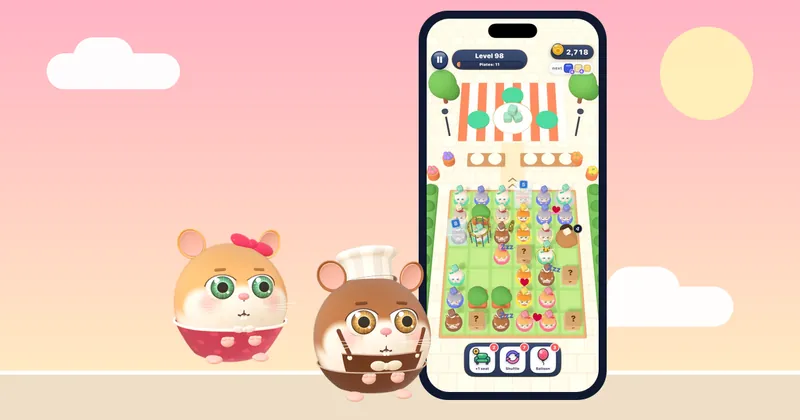
Hamster Jam is a strong example. It's a free food sort puzzle for iPhone that works offline, so you can play it with no signal at all. The hamster gang is hungry and the street is jammed; you tap a hamster whose path is clear and it hops off to its favourite dish, and you keep the waiting bench from overflowing.
Why it's a reliable no-Wi-Fi pick:
- Works offline, with progress saved to iCloud that syncs across devices once you reconnect.
- No timers on your fun, so it's relaxing whether you have five minutes or an hour.
- Every level is solvable (the hundreds of levels are hand-checked), so you never hit a dead end.
- Free to play, with optional extras like coins or an ad-free option, never required to finish a level.
- A free play mode gives you an endless queue of hungry hamsters with no lives needed.
You can play a free level of the hamster puzzle in your browser first to see if the style suits you.
Logic and number puzzles
Sudoku-style games, nonograms and other logic puzzles are offline classics. One puzzle can absorb you for ages, and none of it needs a connection. Great for anyone who enjoys a quiet, patient challenge.
Card and solitaire games
Solitaire and other single-player card games are endlessly replayable and almost always run offline. They're familiar and low-stress, which makes them a dependable choice when you just want something easy.
Word games
Crosswords, word searches and anagram puzzles give your brain a gentle workout with no internet needed, as long as the specific game stores its puzzles on the device. Perfect for word lovers who want something calm.
Restaurant, building and idle games
Many cozy building, decorating and idle games run happily offline, letting you grow or arrange something at your own pace. Just double-check, since a few lean on online features, so the airplane-mode test matters most here.
A simple offline games kit
To always have something ready when the signal drops, keep a small, varied set installed:
- One cozy puzzle for relaxed, absorbing play.
- One logic or number game for a quiet challenge.
- One card game as a familiar fallback.
That trio covers almost any mood and any length of downtime, and none of it needs Wi-Fi.
Offline games for every kind of downtime
No-Wi-Fi games really come into their own when you're on the move. For flights specifically, our guide to the best games to play on a plane covers battery and pre-download tips. If you just want ideas for any dull moment, our list of what to play when you're bored spans every mood. And if you'd prefer something free to try first, our roundup of the best free iPhone games worth downloading is a good next stop.
The bottom line
A game that works without Wi-Fi is one of the most useful things on your phone, always ready, no signal required, no data used. Cozy sort puzzles, logic and number games, solitaire, word puzzles and offline building games all deliver. Install a small, varied set, run the quick airplane-mode test, and you'll never be stuck for something to do. With the right games without Wi-Fi, every dead zone becomes a chance to relax.
Questions
What games work without Wi-Fi on iPhone?
Plenty of genres run fully offline: cozy sort puzzles, sudoku-style logic games, solitaire and other card games, word puzzles, and many building or idle games. The safest way to be sure is to install the game on Wi-Fi, then switch to airplane mode and confirm it opens and plays normally without a connection.
How do I know if a game works offline?
Check the app description for words like "offline" or "play anywhere," and be cautious with games built around live multiplayer or constant leaderboards, which usually need a connection. The surest test is to turn on airplane mode at home, open the game, and see whether it runs as usual. If it does, you're good to go anywhere.
Does Hamster Jam need an internet connection?
No. Hamster Jam works offline, so you can play with no signal at all, ideal for flights, subways or anywhere coverage is poor. Your progress saves to iCloud and syncs across your devices once you reconnect. It's free to play too, with optional extras that are never required to finish a level.
Do offline games use less data and battery?
Generally, yes. Offline games don't stream content or constantly pull in updates, so they use no data once installed and are often gentler on your battery than always-online, graphics-heavy titles. To stretch battery further, lower your screen brightness and stick to calm games like cozy puzzles and card games.